A QR code used to mean one thing: a black-and-white square stuck awkwardly in the corner of a flyer. That era is over. Brands today are weaving QR codes directly into their visual identity, turning a purely functional element into part of the design itself. If your packaging or print materials still rely on a generic, boxy code, you’re missing an easy opportunity to make your brand more memorable and your scan rates higher.
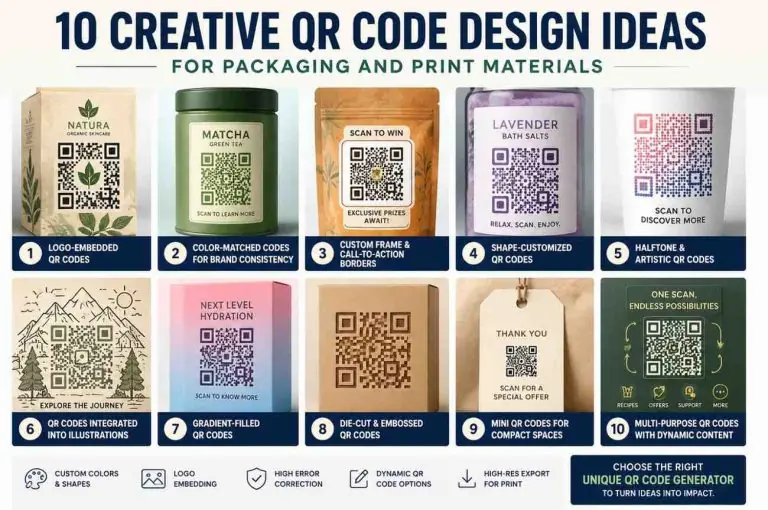
Below are ten creative QR code design ideas you can apply to packaging, labels, brochures, and print campaigns, along with practical tips on using a unique QR code generator to bring each idea to life.
1. Logo-Embedded QR Codes
One of the simplest ways to practice Creative QR Code Design is embedding your logo directly into the center of the code. Most modern QR generators support this without compromising scannability, thanks to built-in error correction that keeps the code readable even with a logo overlay. This works especially well on product packaging, where instant brand recognition matters as much as the scan itself.
2. Color-Matched Codes for Brand Consistency
Standard black-on-white codes feel disconnected from a brand’s visual language. Matching the QR code’s foreground and background colors to your existing palette makes it feel like a natural extension of your packaging design rather than a sticker bolted on at the last minute. Just keep enough contrast between the foreground and background colors so scanners can still read the code reliably.
3. Custom Frame and Call-to-Action Borders
Adding a frame around your QR code with a short call-to-action — “Scan to Win,” “Scan for Recipe,” “Scan to Verify” — gives customers a reason to engage instead of just noticing the code and moving on. Frames also help the code stand out visually on busy packaging, especially when print space is limited.
4. Shape-Customized QR Codes
Rather than the usual grid of square modules, many unique QR code generator tools now let you swap in rounded dots, diamonds, or other module shapes. This subtle shift can make a code feel more premium or playful depending on your brand tone, without affecting how the code functions.
5. Halftone and Artistic QR Codes
A growing trend in packaging design is the halftone QR code — where the code’s pattern blends into a photographic or illustrated image using dot-density techniques. This approach turns the QR code into an actual piece of art rather than a separate design element, which works particularly well for limited-edition packaging, product launches, or seasonal campaigns.
6. QR Codes Integrated Into Illustrations
Beyond halftone effects, some brands fully integrate the QR code into a larger illustration: a code that looks like part of a cityscape, a maze, or a pattern. This requires more design work upfront, but it’s a strong way to make packaging visually distinctive while keeping the code functional.
7. Gradient-Filled QR Codes
Gradients add depth without cluttering the design. A two-tone gradient running through the code’s modules can echo a brand’s existing gradient style (common in beverage, cosmetics, and tech packaging) while still meeting the contrast requirements needed for reliable scanning.
8. Die-Cut and Embossed QR Codes
For physical packaging, a creative QR code design doesn’t have to be purely digital. Die-cutting the code shape into cardboard packaging or embossing it onto a label adds a tactile, premium feel. This works well for gift boxes, specialty food packaging, and luxury retail products where texture matters as much as visuals.
9. Mini QR Codes for Compact Spaces
Print materials don’t always have generous real estate. Business cards, product tags, and small labels often need a compact code that still scans cleanly. Many unique QR code generator platforms let you fine-tune size, padding, and error correction levels specifically for small-format printing, so the code remains functional even at reduced dimensions.
10. Multi-Purpose QR Codes With Dynamic Content
Static codes point to one fixed destination forever. Dynamic QR codes, by contrast, let you change the linked content after printing — useful for packaging that’s produced in bulk and used over a long period. A dynamic code on a product label might point to setup instructions today and a loyalty program signup next quarter, all without reprinting a single label.
Why Creative QR Code Design Matters for Packaging and Print
A well-designed QR code does more than carry a link. It signals attention to detail, reinforces brand identity, and gives customers a reason to engage rather than ignore it. As packaging becomes one of the few physical touchpoints brands have left with customers, a thoughtfully designed code can bridge the gap between a printed product and a digital experience — whether that’s a UPI payment, a product story, a loyalty signup, or user-generated content.
The key is balancing creativity with function. A beautifully designed QR code that doesn’t scan reliably defeats the purpose. Before finalizing any design, test it across multiple devices, lighting conditions, and print sizes to confirm it scans quickly and consistently.
Choosing a Unique QR Code Generator
Not every QR code tool supports the level of customization needed for packaging and print design. When choosing a unique QR code generator, look for platforms that offer logo embedding, custom colors and shapes, adjustable error correction, dynamic code options, and high-resolution export formats suitable for print (not just web use). The right generator turns QR code design from an afterthought into a deliberate part of your packaging strategy.
Frequently Asked Questions
1. Does customizing a QR code’s design affect how well it scans?
Not if done correctly. Reputable QR code generators build in error correction that allows for logos, colors, and shape changes while keeping the code scannable. The key is maintaining sufficient contrast between the code and its background and testing the final design before mass printing.
2. What’s the minimum size for a QR code to remain scannable on packaging?
Most QR codes need to be at least 2×2 cm (about 0.8×0.8 inches) for reliable scanning at typical distances, though this depends on the amount of data encoded and the scanning distance. Smaller, denser codes may need to be larger to remain readable.
3. Should I use a static or dynamic QR code for product packaging?
For packaging that’s printed in large batches or used over a long period, dynamic QR codes are usually the better choice since the linked content can be updated without reprinting. Static codes work fine for one-time campaigns where the destination won’t change.
4. Can I use my brand colors instead of black and white for a QR code?
Yes, as long as there’s enough contrast between the foreground and background colors. Very light colors or low-contrast combinations can cause scanning issues, so it’s best to test the design across different devices before finalizing.
5. What file format should I use when printing a custom QR code?
For print materials, export your QR code as a high-resolution vector file (such as SVG or EPS) or a high-DPI PNG to avoid pixelation. Vector formats are ideal since they scale cleanly to any packaging size without losing quality.