QR codes have quietly become one of the most effective bridges between print and digital marketing. But here’s the catch: a QR code is only as useful as its placement. Stick one in the wrong spot, make it too small, or surround it with clutter, and even the best-designed code will go unscanned.
This guide breaks down exactly how to use a qr code for branding across the most common print formats — business cards, packaging, brochures, and standees — so every scan actually counts.
Why Placement Matters More Than Design
Most brands focus on how a QR code looks — colors, logos, frames — and forget that placement decides whether it gets noticed at all. A QR code needs three things to work: visibility, context, and scanning space. If a potential customer doesn’t see it, doesn’t understand why they should scan it, or can’t get their camera to focus on it, the opportunity is lost.
Before deciding where to place a code, ask: where does this material naturally sit in someone’s hand or line of sight? That single question solves most placement problems.
QR Code on Business Cards: Small Space, Big Impact
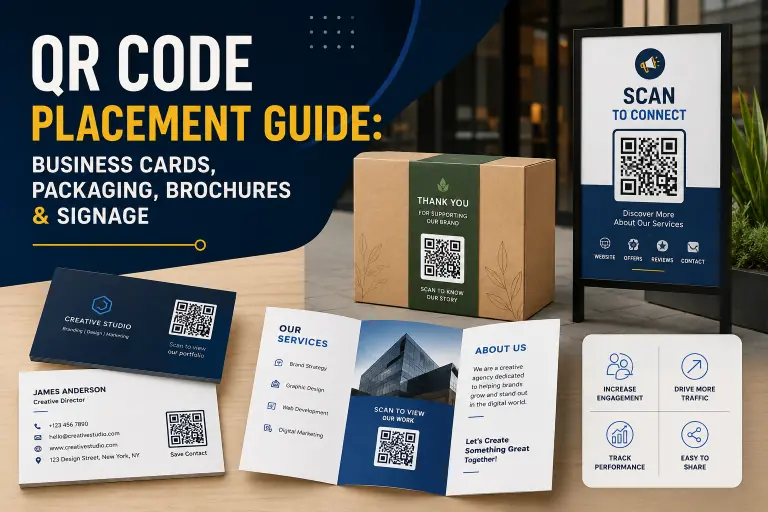
A qr code on business cards is one of the highest-value placements because the card is already a one-on-one handoff moment. The person is already paying attention.
Placement tips:
- Use the back of the card, not the front. Keep the front clean for your name, title, and contact details.
- Keep the code at least 0.8 x 0.8 inches (2 x 2 cm) so it scans easily under normal lighting.
- Link it to something specific — a portfolio, a WhatsApp chat, or a calendar booking link — not just your homepage.
- Avoid placing the code near the card’s edge; printing and cutting tolerances can clip it.
Business cards work best when the QR code feels like a natural next step, not an afterthought squeezed into a corner.
QR Codes on Packaging: Turning the Box Into a Channel
Packaging is unique because the customer already has the product in hand, which means trust is higher and attention is longer than almost any other touchpoint.
Where to place it:
- The side panel or back of the box, near the product description, works better than the front, which should stay focused on branding.
- For unboxing-driven categories (skincare, food, electronics), placing the code near an instruction or “scan to activate warranty” line increases relevance.
- Leave a clear white or contrasting background block around the code — busy packaging art is the most common reason packaging QR codes fail to scan.
A well-placed packaging QR code can support warranty registration, loyalty programs, sourcing transparency, or even product tutorials — all without redesigning the box itself.
Brochures and Flyers: Guide the Eye, Then the Scan
Brochures are read in a sequence, so QR code placement should follow that sequence rather than fight it.
Best practices:
- Place the code at the end of a section or page, right after the relevant message — for example, after a service description or a pricing table.
- If the brochure has a call-to-action line (“Get a free quote”), put the QR code directly beside or below it.
- For multi-fold brochures, the inside-right panel (the last one a reader sees before closing) is a strong, often underused spot.
Avoid putting QR codes on the cover. Covers are for grabbing attention, not converting it — save the code for the moment the reader is already convinced.
QR Code for Standee: Built for a Quick Glance
A qr code for standee placements behaves differently from print-in-hand materials because people view standees from a distance, often while walking past.
Placement tips:
- Position the QR code at eye level, roughly 4 to 5.5 feet from the ground, so people don’t need to bend or look up.
- Make it noticeably larger than you would on a brochure — at least 4 x 4 inches — since scanning distance is greater.
- Pair it with a short, action-driven line like “Scan for menu” or “Scan to register,” since standees are often viewed for just a few seconds.
- Avoid placing standee codes near doors, AC vents, or high-traffic pinch points where people won’t pause to scan.
Standees at events, retail entrances, or reception areas work best when the QR code is the single clearest action on the entire display — not one of five competing messages.
A Quick Placement Checklist
Across all formats, a few rules consistently improve scan rates:
- Always leave quiet space (margin) around the code — no text, logos, or images touching it.
- Test print the code at actual size before mass production; some QR generators distort at scale.
- Match the code’s color contrast to standard scanning needs — dark code on light background performs best.
- Add a one-line reason to scan; an unexplained code gets ignored far more often than a code with context.
Final Thoughts
A qr code for branding strategy isn’t just about generating a code — it’s about understanding how each material is held, viewed, or walked past, and placing the code accordingly. Business cards reward subtlety, packaging rewards relevance, brochures reward sequence, and standees reward visibility. Get the placement right, and the QR code stops being a design element and starts being a genuine growth channel.
FAQs
1. Where should I place a QR code on a business card?
On the back of the card, sized at least 2×2 cm, away from the edges to avoid print or cutting errors.
2. Does QR code placement actually affect scan rates?
Yes. Poor lighting, clutter around the code, or placement in low-attention areas (like a brochure cover) significantly reduce scans regardless of design quality.
3. What size should a QR code for standee be?
At least 4×4 inches, positioned at eye level, since standees are typically viewed from a distance.
4. Can I place a QR code anywhere on packaging?
Technically yes, but side or back panels near relevant product information perform better than busy front-of-pack areas.
5. What’s the biggest mistake brands make with QR code placement?
Treating placement as an afterthought — adding the code wherever space is left, instead of choosing a spot based on how the material is actually viewed or held.