
Your ad caught their eye. Now let it capture their action.
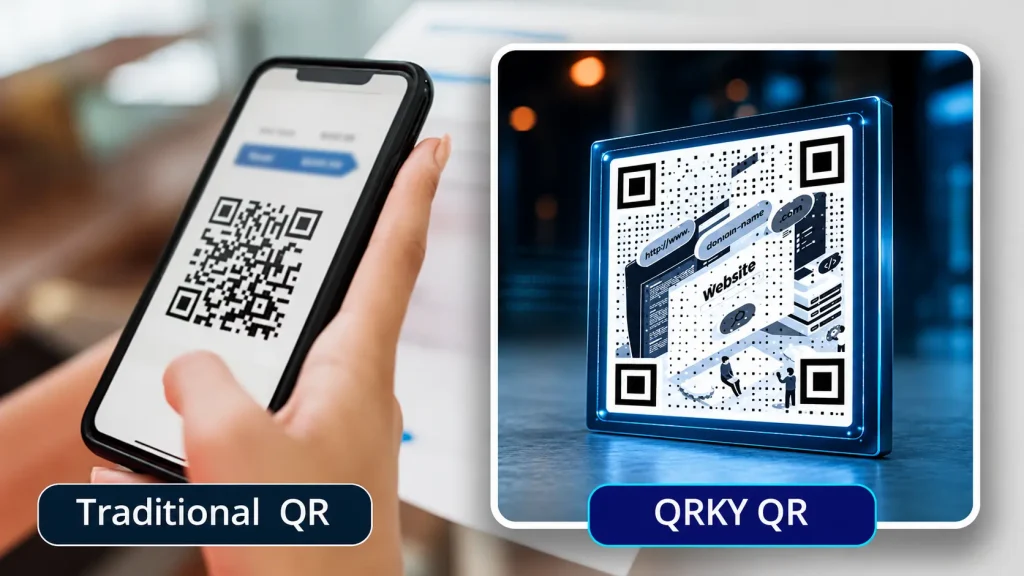
Turn Any Photo into a Scannable QRKY QR
Free. No sign-up.

Turn any photo into a scannable QRKY QR — no sign-up
Create your graphical QR
Advanced / endpoints
Adjust your photo
Drag to move • Corners to resize • Double-click to reset
Generating your QR codes…
Your QRKY QR
Saving removes the watermark for paid accounts and stores it under your QRKY account.
Create Free Scannable QR Codes for Every Marketing Asset
Website QR code generator
Create QR codes that instantly open your website—simple, reliable, and) easy to use. Website QR codes help users reach your site in seconds. Instead of typing long URLs, users can scan and land directly on your webpage using their phone camera.
Significance of a Website QR Code Generator
A website QR code generator creates QR codes that link directly to a website or webpage. When scanned, the QR code opens the site instantly on the user’s device.
These QR codes act as a simple bridge between offline materials and online content. Instead of remembering or typing a URL, users can access a website with a single scan.
For businesses, this makes website discovery faster, easier, and more accessible across real-world touchpoints.
Why Businesses Create QR Codes for Websites
Website QR codes remove unnecessary steps from the user journey. They make it easier for users to visit a website without typing or searching.
They also improve engagement from offline materials such as posters, packaging, and printed ads by turning passive exposure into instant action.
By simplifying access, businesses increase the likelihood that users actually visit their website.
Can Website QR Codes Be Created for Free?
Many users begin by creating website QR codes for free. Free creation allows businesses and individuals to test placements, scan behavior, and real-world usage.
Free tools are commonly used for early trials, small campaigns, and internal testing before wider deployment.
This approach encourages experimentation without adding cost pressure at the start.
How Website QR Codes Work
Website QR codes encode a website URL into a scannable pattern. When scanned, the device instantly opens the linked webpage in a browser.
The process works seamlessly across most smartphones without requiring additional apps.
For first-time users, this simplicity provides reassurance that website QR codes are easy to create and use.
Where Website QR Codes Are Commonly Used
Website QR codes are widely used across physical and digital environments:
- Business cards
- Product packaging
- Posters and flyers
- Retail displays
- Events, exhibitions, and conferences
In each case, they help convert attention into immediate website visits.
Website QR Codes in Real-World Journeys
Website QR codes help bridge real-world moments with digital experiences, making it easy for users to move from physical touchpoints to online destinations instantly.
- Guide users from posters, packaging, or storefronts directly to websites, landing pages, or campaigns
- Update website destinations anytime using dynamic QR codes—no reprints needed
- Track scans and user engagement to understand real-world journey performance
- Adapt QR journeys across locations, audiences, and campaign phases in real time
Website QR Codes vs Sharing URLs Manually
Website QR codes remove friction from the customer journey by replacing long, error-prone URLs with a single, instant scan.
- No typing required—users reach the website in seconds with their phone camera
- Eliminates broken links, spelling errors, and drop-offs common with manual URL sharing
- Works seamlessly across print, packaging, events, and offline touchpoints
- Enables dynamic updates and scan tracking, unlike static, manually shared links
- Creates a faster, more intuitive experience that increases engagement and conversions
Best Practices When Creating Website QR Codes
To ensure reliable performance:
- Use clear, active, and correct URLs
- Ensure strong contrast and sufficient size
- Test scans across multiple devices and browsers
These practices help ensure users reach the intended webpage without issues.
Create a QR Code for Your Website
Create QR codes that bring users directly to your website.
Start simple, place them where attention already exists, and make online access effortless for your audience.
Create Your QRKY QR in 3 Simple Steps
1
Enter Your URL
2
Upload Your Photo
3
Generate QRKY QR
Used and Trusted
Proven across industries and environments






FAQs
What is a website QR code generator?
A website QR code generator creates QR codes that link directly to a website or webpage. When scanned, the site opens instantly on the user’s device.
How do I create a QR code for my website?
You enter your website URL into a QR code generator, generate the QR code, and place it wherever users can scan it easily.
Are website QR codes free to create?
Yes, many tools allow free creation of website QR codes, which is useful for testing and small-scale use.
Where should website QR codes be used?
They work well on business cards, posters, packaging, retail displays, and event materials—anywhere users may want quick access to a website.
Do website QR codes work on all phones?
Most modern smartphones can scan website QR codes directly using the built-in camera or standard QR scanning apps.
Can website QR codes be printed?
Yes. Website QR codes are commonly used on printed materials and work reliably when printed clearly and tested beforehand.
Do website QR codes improve engagement?
By reducing steps and effort, they make it easier for users to visit a website, which often leads to higher engagement.
Is internet required to use a website QR code?
Yes. An internet connection is needed to open the linked website after scanning the QR code.
Can I use website QR codes for marketing?
They are widely used in marketing to direct users to landing pages, promotions, and campaign websites.
Should I test website QR codes before using them publicly?
Always. Testing ensures the QR code opens the correct webpage across devices and browsers.
Ready to Create Your QRKY QR?
Turn any photo into a fully scannable QRKY QR in just a few clicks. Start for free; no sign-up required, or connect with our team to discover how QRKY can elevate your next campaign.
