College project presentations have changed significantly over the past few years. Instead of relying only on printed reports and PowerPoint slides, students now use digital tools to create engaging and interactive presentations. One of the simplest yet most effective tools is the QR code.
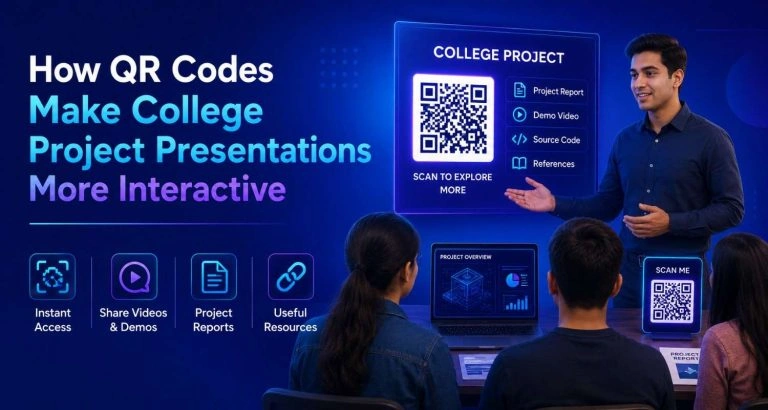
A QR code for college projects allows students to connect physical presentation materials with digital content. With a quick scan, teachers and classmates can access project reports, demonstration videos, websites, research papers, source code, presentations, or portfolios within seconds.
Whether you’re presenting a science project, engineering prototype, business case study, or research paper, QR codes can help make your work more organized, professional, and memorable.
Why Use QR Codes in College Project Presentations?
Traditional project presentations often have limitations. Students may struggle to share large files, provide additional resources, or demonstrate working prototypes within a limited presentation time.
QR codes solve these problems by acting as a bridge between printed materials and online resources.
Instead of writing long URLs on presentation boards or slides, students simply display a QR code that links directly to the required information.
This makes presentations cleaner, faster, and easier to understand.
Benefits of Using a QR Code for College Projects
1. Easy Access to Project Reports
Many college projects include detailed reports that are too lengthy to print multiple copies.
By adding a QR code to your presentation, examiners can instantly download or view the complete report on their devices.
This saves printing costs while ensuring everyone has access to the latest version.
2. Share Demonstration Videos
Some projects are difficult to explain through images alone.
For example:
- Robotics projects
- Mobile applications
- IoT systems
- Software applications
- Mechanical prototypes
A QR code can direct viewers to a demonstration video showing the project in action.
This provides better understanding than static screenshots.
3. Display Source Code
Computer science and software engineering students often need to submit source code.
Instead of carrying USB drives, students can link a QR code to a GitHub repository or cloud storage folder.
Faculty members can review the code whenever needed.
Project exhibition posters usually contain limited information.
4. Create Interactive Presentation Posters
A QR code for college projects allows visitors to explore much more, including:
- Complete documentation
- Design files
- Research references
- Video demonstrations
- Technical specifications
- User manuals
5. Improve Organization
The poster remains clean while offering unlimited additional information.
Instead of sharing multiple links individually, students can combine everything into one landing page and generate a single QR code.
This creates a better user experience for evaluators.
How QR Codes Improve Student Engagement
Interactive presentations naturally attract more attention.
When teachers or classmates scan a QR code, they actively participate in exploring the project rather than simply listening to a presentation.
This increases engagement during:
- Final year project presentations
- Research seminars
- Science exhibitions
- Technical workshops
- Classroom demonstrations
Students also feel more confident because all supporting materials are readily available.
Using QR Codes for College Assignments
The benefits extend beyond presentations.
A QR code for college assignments helps students submit additional resources without making printed documents bulky.
For example, assignment QR codes can link to:
- Reference articles
- Recorded presentations
- Spreadsheet data
- Design files
- Programming code
- Survey results
- Online portfolios
Teachers can verify supporting documents instantly.
Best Places to Add QR Codes
Placement matters.
Students should include QR codes in:
- Cover page of the project report
- Presentation slides
- Project posters
- Handouts
- ID cards during exhibitions
- Business model canvas
- Research papers
- Prototype labels
Ensure the QR code is large enough to scan easily from a reasonable distance.
Use Dynamic QR Codes
Tips for Creating Effective QR Codes
Dynamic QR codes allow you to update the destination link even after printing the QR code.
If you need to correct a document or upload a new version, you won’t have to print everything again.
Test Before Presenting
Always scan the QR code using multiple smartphones before your presentation.
Broken links can leave a poor impression.
Keep the Linked Content Organized
Instead of sending viewers to several websites, create one landing page that contains:
- Project summary
- Report
- Presentation
- Demo video
- Contact details
- Source code
- References
Everything becomes easy to navigate.
Choose High Contrast
Black QR codes on a white background generally offer the best scanning performance.
Avoid placing QR codes over patterned backgrounds.
Use Adequate Size
Small QR codes may become difficult to scan during exhibitions or classroom presentations.
Print them at a sufficient size so viewers can scan them comfortably.
- Real-Life Examples
Engineering Students
An engineering team developing an automated irrigation system can attach a QR code linking to sensor data, circuit diagrams, Arduino code, and a working demonstration video.
MBA Students
Business students presenting a market research project can use QR codes to provide detailed survey reports, financial models, and customer interviews.
Architecture Students
A QR code can showcase 3D building models, walkthrough videos, and high-resolution design drawings that cannot fit on printed boards.
Computer Science Students
Software developers can link directly to live applications, GitHub repositories, installation guides, and API documentation.
Common Mistakes to Avoid
Students often make simple mistakes when using QR codes.
Avoid these issues:
- Linking to private Google Drive files
- Using expired URLs
- Printing very small QR codes
- Placing QR codes where lighting is poor
- Forgetting to test the QR code before submission
- Using multiple QR codes when one is sufficient
Checking everything in advance ensures a smooth presentation.
Why Dynamic QR Codes Are Better
Static QR codes work well for permanent links.
However, dynamic QR codes offer more flexibility.
They allow students to:
- Update links anytime
- Correct errors after printing
- Track scan activity
- Manage multiple resources
- Keep projects current without reprinting
This makes them ideal for long-term academic projects.
Final Thoughts
Technology continues to reshape the way students learn and present their work. A QR code for college projects transforms traditional presentations into interactive experiences by connecting printed materials with digital resources such as reports, videos, websites, and portfolios.
Similarly, a QR code for college assignments makes it easier to organize supporting documents, submit multimedia content, and provide additional references without increasing paperwork.
Whether you’re working on a research paper, final-year project, engineering prototype, or business presentation, adding a QR code is a simple upgrade that improves accessibility, professionalism, and engagement. By following best practices and testing your QR code before submission, you can deliver a more polished and memorable presentation that stands out to teachers, evaluators, and classmates alike.
Frequently Asked Questions
1. What is a QR code for college projects?
A QR code for college projects is a scannable code that links to digital resources such as reports, presentations, videos, websites, or source code, making project presentations more interactive.
2. Can I use a QR code for college assignments?
Yes. A QR code for college assignments can link to research papers, reference materials, spreadsheets, videos, or cloud documents, allowing teachers to access supporting resources instantly.
3. Are QR codes free to create?
Many QR code generators offer free static QR codes. Dynamic QR codes with editable links and analytics are usually available through premium plans.
4. Where should I place a QR code in my project presentation?
You can place it on the report cover page, presentation slides, project poster, exhibition display, or assignment handout for easy access.
5. Should I use a static or dynamic QR code?
Dynamic QR codes are generally the better option because you can update the linked content without changing the printed QR code, making them ideal for academic projects.