For a small business, getting paid should be simple. Whether a customer is standing at your counter, ordering through WhatsApp, attending an event, or settling an invoice remotely, every extra step can create friction.
This is why businesses are increasingly choosing between UPI QR payment and payment links. Both make digital payments easier, but they work best in different situations. A QR code can turn a physical location into an instant payment point, while a payment link brings the same convenience into digital conversations.
So, which option should a small business use? The answer depends on where customers are and how they interact with your business.
Make In-Person Payments Faster with a QR Code
For businesses that regularly serve customers face-to-face, a QR code can make payments considerably more convenient. Instead of asking customers to enter a long UPI ID, businesses can display a QR code that customers can easily see and scan.
A customer at a retail counter, café, salon, food stall, workshop, or college event can scan the code through a compatible UPI app, verify the details, and complete the transaction. This makes QR payment for business particularly useful where several customers need to pay within a short period.
Businesses can place the QR code on:
- Checkout counters
- Table displays
- Invoices
- Receipts
- Posters
- Event registration desks
- Packaging
- Signboards
A clearly positioned QR code also reduces the need to explain payment instructions repeatedly.
Send Payment Requests Directly to Remote Customers
Not every customer will visit your business. Freelancers, consultants, tutors, online sellers, and service providers often deal with customers remotely.
In these situations, a payment link can be more practical. Businesses can share the payment request through WhatsApp, email, SMS, social media, or an online invoice.
Consider a freelance designer sending a completed project to a client. Instead of asking the client to locate a physical QR code, the designer can include the payment option directly in the invoice or message.
Payment links work well for:
- Remote consultations
- Online classes
- Advance bookings
- Freelance services
- Digital orders
- Service deposits
- Invoice payments
The key advantage is context. The payment option appears exactly where the customer is already communicating with the business.
Reduce Friction at Physical Checkout Points
Payment should be one of the easiest parts of a customer’s purchase journey. A strategically placed digital payment QR code can reduce unnecessary steps.
A café can display its QR code at the billing counter. A salon can place one at reception. A pop-up seller can display one next to their products, while an event organizer can position it at the registration desk.
The customer sees the code, scans it, verifies the details, and completes the payment. In busy environments, removing even a few unnecessary steps can create a smoother experience.
Add Payment Options to Invoices and Receipts
Invoices and receipts can also become useful digital touchpoints.
A business can add a payment QR code to a printed invoice, allowing customers to initiate payment directly. Payment links can serve a similar purpose in digital invoices.
The distinction is simple:
Printed invoice: A QR code connects the physical document with the digital payment experience.
Digital invoice: A payment link provides a direct clickable route.
The best option depends on how the invoice reaches the customer.
Use QR Payments Where Customers Already Interact with You
The strongest QR implementations usually feel natural. A restaurant does not need to place a QR code randomly across its premises. It can position one when customers are already taking an action, such as paying a bill.
Similarly, a retailer can place one near the checkout, while an event organizer can position one at registration or a merchandise counter.
The principle is simple: put the payment option where the payment decision happens.
Create a More Seamless Payment Experience Across Touchpoints
As digital payments become a normal part of everyday transactions, the surrounding experience matters too. A QR code should be easy to notice and scan, while a payment link should appear where customers expect to find it. Clear instructions and a simple payment journey can make the overall experience more convenient.
This is also where modern QR platforms are moving beyond basic code generation. QRKY, for example, approaches QR codes as broader digital experiences rather than simply static patterns. Businesses can create visually engaging QR experiences that fit naturally into physical and digital touchpoints.
The objective is straightforward: make the next customer action easier.
UPI QR Code Payment vs. Payment Links: Which Is Better?
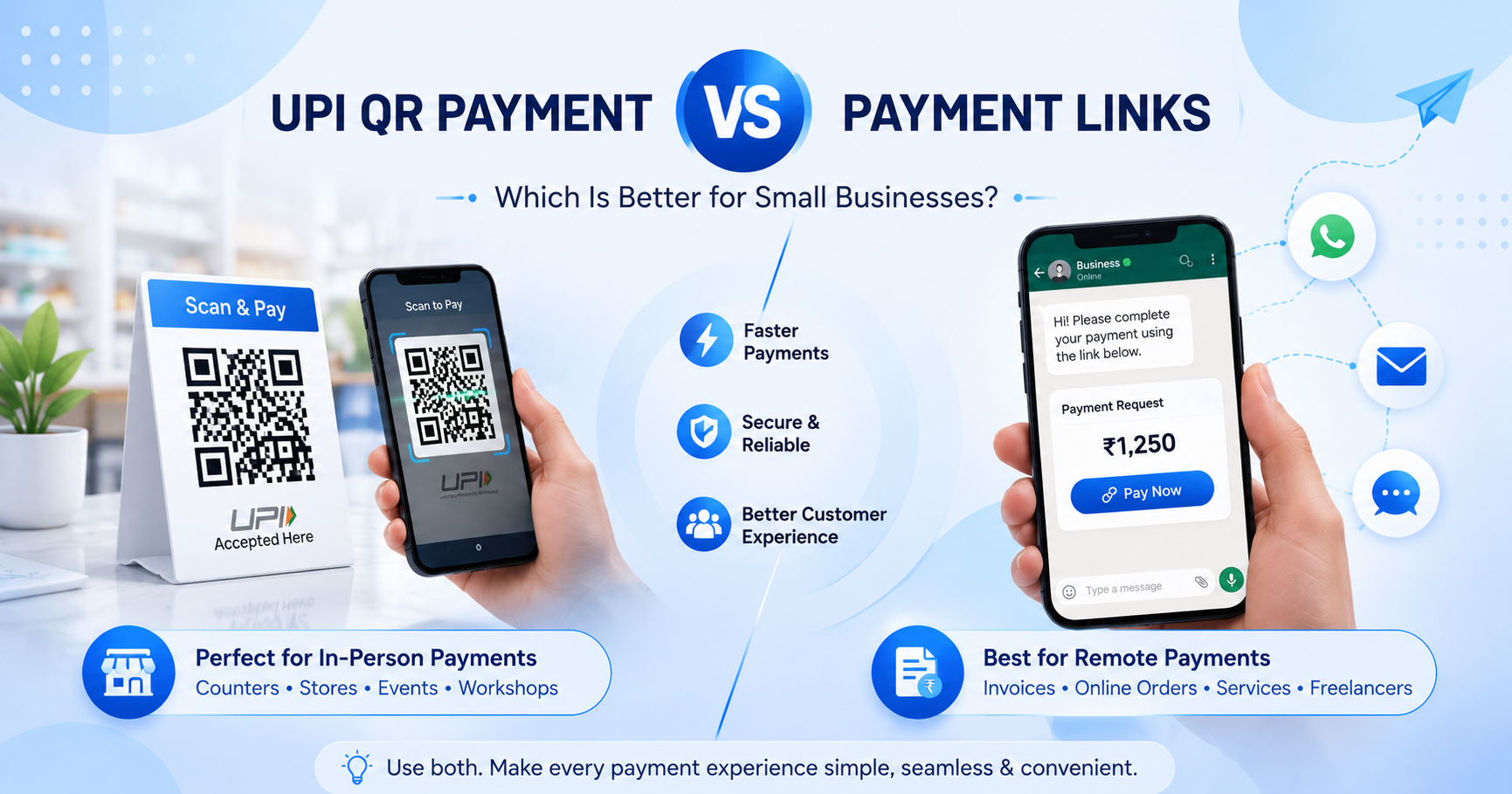
There is no single winner. UPI QR Payment is generally more practical when customers are physically present and need a quick way to pay. It works well for retail stores, restaurants, events, and service counters.
Payment links are more suitable for customers who interact with the business remotely via WhatsApp, email, invoices, or other digital channels.
For many small businesses, the most practical solution is to use both. QR codes can support physical transactions, while payment links can handle remote ones.
The important question is not, “Which payment method is better?” It is, “Which payment method makes payment easier for this customer, in this situation?”
Final Thoughts
A successful payment experience should fit naturally into the customer’s journey. When customers are standing in front of you, a visible QR code can offer a quick, familiar way to pay. When they are interacting remotely, a payment link can bring the same convenience directly into the conversation.
For small businesses, combining both can create a flexible payment system while reducing unnecessary steps. The goal is not to add payment options simply for the sake of choice, but to make every transaction simple, accessible, and convenient.
Ready to create smarter QR experiences for your business? Explore QRKY to build QR codes that fit naturally into physical and digital customer touchpoints. Whether you are adding a payment option to a counter, invoice, event, or promotional asset, create a QR experience that makes the next customer action simple. Start creating with QRKY today.
FAQs:
1. Is UPI QR Payment better than a payment link for small businesses?
It depends on how customers interact with the business. UPI QR Payment is generally convenient for in-person transactions, while payment links are more suitable for remote customers. Businesses that serve customers both offline and online can use both to provide a flexible payment experience.
2. Can a small business use QR codes and payment links together?
Yes. A small business can display a QR code at its physical location while sharing payment links through WhatsApp, email, invoices, or other digital channels. Using both allows businesses to adapt the payment process to different customer situations without complicating the overall payment experience.
3. What is the main advantage of a QR payment for business?
The main advantage is convenience during physical transactions. Customers can scan a QR code using a compatible payment app instead of manually entering payment information. This can make payments easier at counters, restaurants, events, stores, workshops, and other in-person business environments.
4. Can a digital payment QR code be used on printed materials?
Yes. A digital payment QR code can be placed on suitable materials such as counter displays, posters, receipts, brochures, invoices, and event signage. Businesses should test the final printed version before distributing it to ensure the QR remains clear, properly sized, and easy for customers to scan.
5. Should a small business choose only one payment method?
Not necessarily. The better approach depends on the customer’s payment journey. Businesses serving customers in person may benefit from QR payments, while remote customers may prefer payment links. Offering both can create a more convenient experience across different customer interactions and business channels.