“What’s your UPI ID?” It sounds simple, but typing a long payment ID manually is hardly the fastest way to pay. One missing character can cause an error, while repeatedly copying and sharing payment details can be inconvenient.
Now imagine replacing all those steps with a simple scan. That is where a UPI QR code makes a difference. Whether it’s a professional collecting a client payment, a student organizing a college event, a small business owner accepting payments, or simply splitting a bill with friends, a QR code can make the payment experience faster and more convenient.
Creating one does not require advanced technical skills either. With a reliable UPI QR code generator, you can turn your payment details into a scannable code in just a few steps.
What is a UPI QR Code?
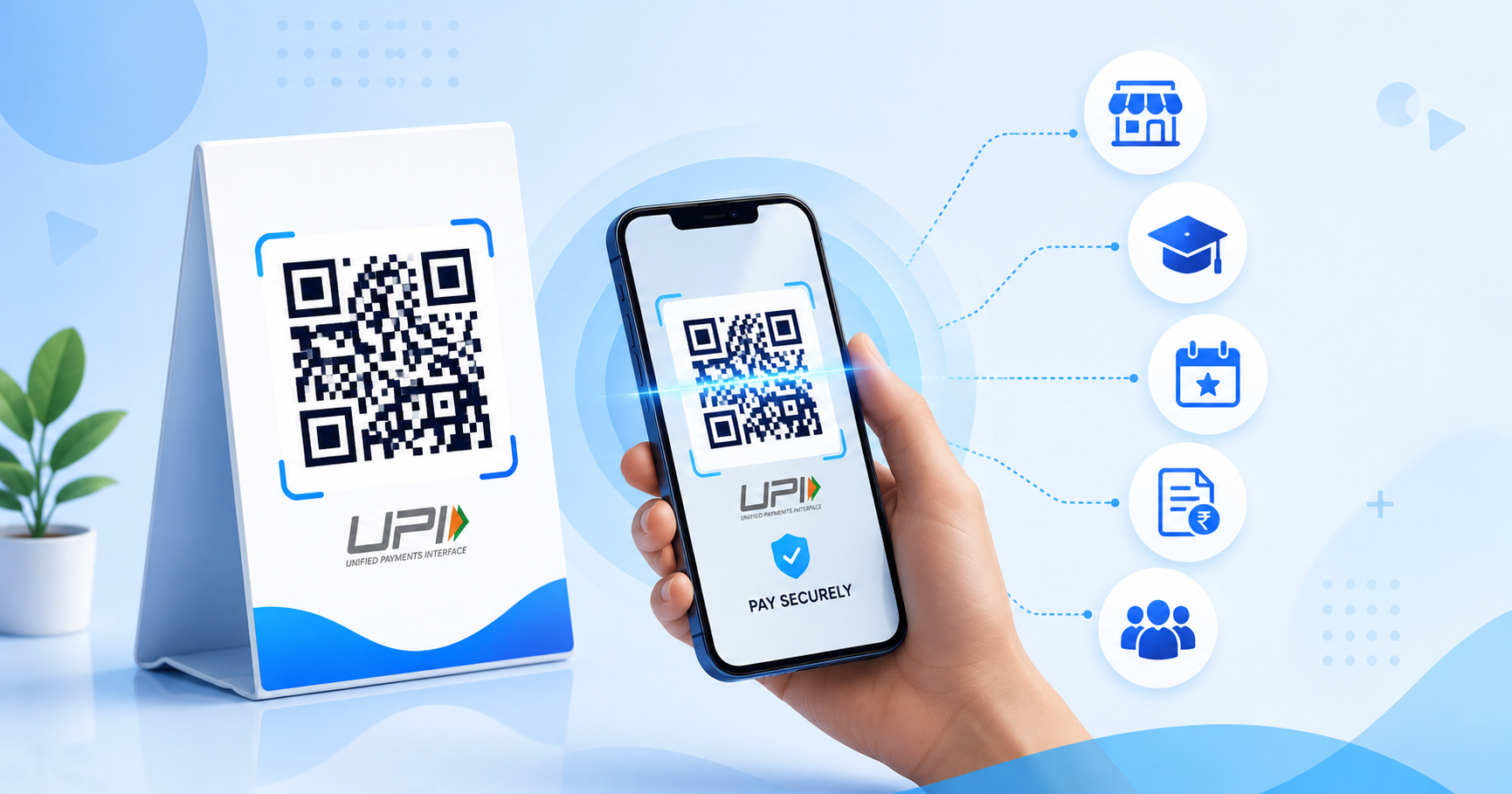
A UPI QR code is a scannable code that contains payment information. When someone scans it with a compatible UPI app, the relevant payment details appear in the payment interface, allowing the user to proceed with the transaction.
Instead of manually entering a UPI ID, the payer can simply scan, verify the displayed details, enter the amount if required, and complete the payment.
This makes QR-based payments useful across many situations, including:
- Retail and small businesses
- Freelance services
- College events and student activities
- Workshops and classes
- Professional invoices
- Food stalls and pop-up businesses
- Personal payments
How to Create a UPI QR Code
Creating a payment QR code is relatively straightforward. Here is a simple process to follow.
1. Keep Your UPI Details Ready
Start with the correct UPI ID or payment information you want to connect to the QR code. Check the details carefully before generating the code. A QR code can only be useful if it points to the intended payment destination.
2. Choose a QR Code Generator
Select a platform that supports the type of QR code you need. A free QR code generator can be suitable for individuals, students, freelancers, and small businesses looking to create a basic QR without investing in complex software. For users who want a more flexible experience, a UPI QR code generator can make it easier to create a payment-focused QR code based on their specific needs.
3. Enter Your Payment Details
Select the relevant payment option and enter your UPI information. Depending on the platform and intended use, you may also be able to configure a specific payment amount. For situations where different users need to pay different amounts, the payer can enter the appropriate amount at the time of the transaction.
4. Customize the QR Code
A payment QR code does not have to look disconnected from the surrounding material. If customization is available, you can adjust visual elements such as colours, patterns, frames, or other design features. A business could integrate the code into its branding, while a student organizing a college event could include it on the event poster. A customized UPI payment QR can also fit more naturally into invoices, posters, counters, brochures, and other payment touchpoints.
5. Test Before Sharing
Scan the completed QR code using a compatible UPI app and verify the payment details that appear. Make sure everything is correct before printing or distributing it. If you are placing the QR on a poster, invoice, standee, brochure, or signboard, test the final version rather than only testing the digital file.
Where Can You Use a UPI QR Code?
A payment QR can be adapted to different audiences and environments.
For Professionals and Freelancers
Consultants, tutors, designers, photographers, and other independent professionals can place QR codes on invoices, payment requests, or printed materials. Clients can scan the code instead of manually entering payment information.
For Students
Students can use QR codes for legitimate college activities such as club events, workshops, fundraisers, or group activities. For example, a college event organizer can place a payment QR code on a registration poster, allowing participants to complete payment quickly.
For Small Businesses
Retailers, food stalls, salons, service providers, and other local businesses can display QR codes at checkout points. A visible, well-designed QR can provide customers with a convenient alternative to manually entering payment details.
For Events
QR codes can also support payments at registration desks, merchandise counters, food stalls, workshops, and other event touchpoints. When several attendees need to make payments within a short period, reducing unnecessary steps can make the overall experience smoother.
Is a Free QR Code Generator Enough?
For one-time or occasional use, a basic free QR code generator may be all you need. But recurring business and professional use can require more control. As QR campaigns grow, features such as dynamic management, customization, analytics, and centralized QR organization can become increasingly useful. The right choice therefore depends on what you expect the QR code to accomplish.
A payment QR may begin as a simple way to receive money, but the broader QR experience matters too. A clear design, reliable destination, easy access, and consistent presentation can all contribute to a better interaction.
This is where modern QR platforms are moving beyond simply generating black-and-white codes. QRKY, for example, focuses on creating QR experiences that are visually engaging, customizable, and useful across a range of real-world applications. The idea is not to make QR codes more complicated, but to make the experience behind every scan more effective.
Final Thoughts
A UPI QR code can remove unnecessary friction from everyday payments. Whether you are a student collecting event fees, a freelancer requesting payment, a professional sending an invoice, or a business serving customers, a simple scan can make the interaction considerably easier.
The process is straightforward: use the correct payment details, generate the QR code, ensure the design remains scannable, and test it before putting it in front of users. When these basics are handled well, a UPI payment QR becomes more than a payment shortcut. It becomes a convenient digital touchpoint between you and the person paying you.
Ready to create a QR experience that works as smoothly as the payment itself? Explore QRKY and create a UPI QR code generator experience tailored to how you want people to interact with your business, event, service, or payment request. Create your QR with QRKY today and turn a simple scan into a smarter digital experience.
FAQs:
1. Can I create a UPI QR code for free with QRKY?
Yes. QRKY can help you create QR codes for payment-related use cases, making it easier to share payment information through a simple scan. This can be useful for professionals, freelancers, students, small businesses, event organizers, and others who regularly accept digital payments.
2. Can students use a UPI QR code for college events?
Yes. Students can use payment QR codes for suitable college activities such as event registrations, workshops, club activities, fundraisers, and merchandise counters. A QR code can simplify the payment process by allowing participants to access payment details quickly on their smartphones.
3. Can businesses customize their UPI QR codes?
Yes. A customized QR code can be designed to complement the visual style of a business, event, invoice, poster, or other payment material. With thoughtful customization, businesses can make their QR codes more noticeable while maintaining a clear and convenient scanning experience for customers.
4. Should I test a UPI QR code before printing it?
Absolutely. Always scan the QR code with a compatible UPI app and verify the payment details before printing or distributing it. Testing the final version is especially important when the code will appear on posters, invoices, standees, brochures, or other printed materials.
5. Can QRKY be used for purposes beyond UPI payments?
Yes. QRKY is designed around broader QR experiences, enabling QR codes to support a range of real-world applications beyond payments. Businesses and organizations can use QR codes for marketing, events, communication, customer engagement, and other applications where connecting physical materials with digital experiences is valuable.