
The classroom has been transformed, and it’s not due to the advancements in technology within it. The way learning materials are accessed, shared, and engaged with has changed fundamentally. A QR code for students isn’t just a trick to add to a lesson plan. It’s a real-world method for removing the kinks between the learning goal and the source that helps achieve it.
For teachers, it can reduce administrative time. Institutions can open the door to new ways to manage communication, events, and even brand awareness. This is how it works through eight actual scenarios.
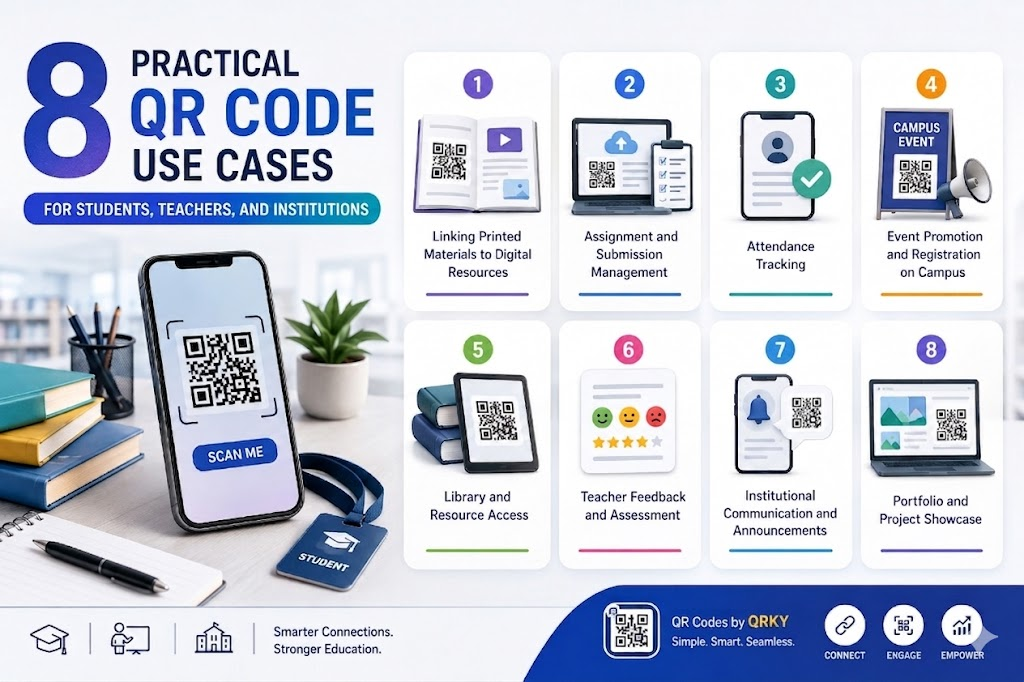
1. Linking Printed Materials to Digital Resources
Textbooks, worksheets, handouts, and other materials contain a set amount of information. A QR code printed along an article links the materials to videos, interactive games, research papers, and longer reading. Students who wish to learn more about the subject can access it directly. Students who need a concept taught differently, via animated examples, work samples, or audio, can access the content without the teacher needing to distribute or source it separately.
It is one of the most instant and flexible applications of QR code for students who need only a QR code generator and an open URL to the linked resource.
2. Assignment and Submission Management
Instead of coordinating submission portals with verbal instruction, as well as email chains. Teachers could put a QR code on an assignment brief that links directly to submission forms, the grading rubric, and an important deadline warning. Students scan the QR code once and can have everything they need in one place. This reduces the number of clarification questions and ensures that all students get the same information simultaneously.
3. Attendance Tracking
Manual attendance registers can be time-consuming and susceptible to mistakes. The unique QR code displayed at the beginning of each class, projected on a slide, or printed on a card, and then scanned by each student, generates an electronic attendance record immediately. The process takes less than 30 seconds per session and generates accurate, exportable data that can be used for administrative purposes.
4. Event Promotion and Registration on Campus
Campus events, such as clubs, festivals, sporting fixtures, and seminars, generate significant posters and flyers. The student QR code, placed in the collateral of an event rather than printed on a whim, enables direct registration without manual follow-up. Dynamic QR codes are especially helpful in this situation. If a registration link or event details change, the QR code destination can be updated without reprinting the poster.
This is where the QR code for branding is important for institutions. It is a common practice to design QR codes throughout campus communications, utilizing branding colours, logo placement, and a distinct aesthetic style, which helps to create an institutional brand identity that is a source of trust for students and authority.
5. Library and Resource Access
Library catalogs and resource lists quickly become outdated. QR codes on shelving areas, reading list printouts, and subject guides connect directly to live catalog searches, digital loan systems, and online access to journals. Students can find what they require more quickly, while library staff have less time to focus on directed questions.
6. Teacher Feedback and Assessment
Giving meaningful feedback on a course, module, or exam is challenging when the means to do so is a paper form that students might or might not be able to complete. A QR code displayed at the end of a class that links to a brief digital feedback form can boost the likelihood that students will complete it. It takes less than an hour to complete on a mobile device and collects feedback while the material is still being absorbed.
7. Institutional Communication and Announcements
Student handbooks, notice boards, and campus signs are the main communication channels for many institutions, and they’re often outdated. QR codes displayed on these materials link to a live announcements page or a frequently refreshed resource hub, solving the issue of currency without regular physical updates to printed materials.
Institutions that want to build a campus image. This is also a non-used QR code for branding possibilities. A well-designed QR code system across all touchpoints for the institution, such as entrance signs, student ID cards, newsletters, and so on, helps build brand consistency and demonstrates that you are thinking digitally for future students and parents.
8. Portfolio and Project Showcase
Final year projects, research publications, and student portfolios aren’t often considered outside of the immediate assessment context. A QR code printed on a board for project work, graduation programs, or a brochure for an institution links to the student’s online portfolio or published work, giving it credibility and permanence it might not otherwise have. If you are looking for students in technical or creative fields, it’s a highly professional and relevant app.
Using a QR code for students in portfolio showcases also helps institutions demonstrate innovation and digital-first learning experiences.
Building an Education Environment That Works Harder
The kinks in the field of education, like distributing materials, managing submissions, organizing events, and tracking attendance, aren’t difficult problems. They’re routine ones. QR codes can’t solve difficult educational challenges. They eliminate the administrative burden that takes up time for both students and teachers, freeing up time to focus on what matters most: teaching and learning.
The schools and institutions that see the most benefits are those that treat QR codes as a planned system, not as individual codes, and as a consistent, purposeful layer that runs through every aspect of learning. If every scan is truly useful and each code is used with care and purpose, the technology can improve the experience for everyone in the facility.
QRKY lets you design dynamic, branded QR codes that are trackable and suitable for every educational need, from linking resources to registering for events. No watermarks, no difficult installation. Test it for free by visiting www.qrky.ai and start creating a better QR code for branding experiences across educational environments now.
FAQs:
1. How can students use QRKY QR codes creatively?
Students can use QRKY to create QR codes for portfolios, resumes, event promotions, club activities, presentations, social profiles, and project submissions. Since QRKY supports image-based QR designs, students can make their work look more creative, interactive, and visually impressive.
2. Can teachers use QRKY in classrooms?
Yes. Teachers can use QRKY QR codes to share assignments, study materials, quizzes, attendance forms, presentations, and educational resources quickly. Creative QR designs also make classroom interactions more engaging and encourage better student participation during lessons and activities.
3. How can institutions benefit from QRKY?
Schools, colleges, and universities can use QRKY for campus navigation, admission campaigns, event promotions, student registrations, digital brochures, and feedback systems. Branded QR experiences help institutions improve communication while creating a more modern and tech-friendly campus environment.
4. Are QRKY QR codes useful for college events?
Absolutely. Student clubs and institutions can use QRKY to create eye-catching event posters where the QR itself becomes part of the design. This increases curiosity, improves scan rates, and helps organizers drive registrations, attendance, and engagement more effectively.
5. Why do students prefer creative QR codes?
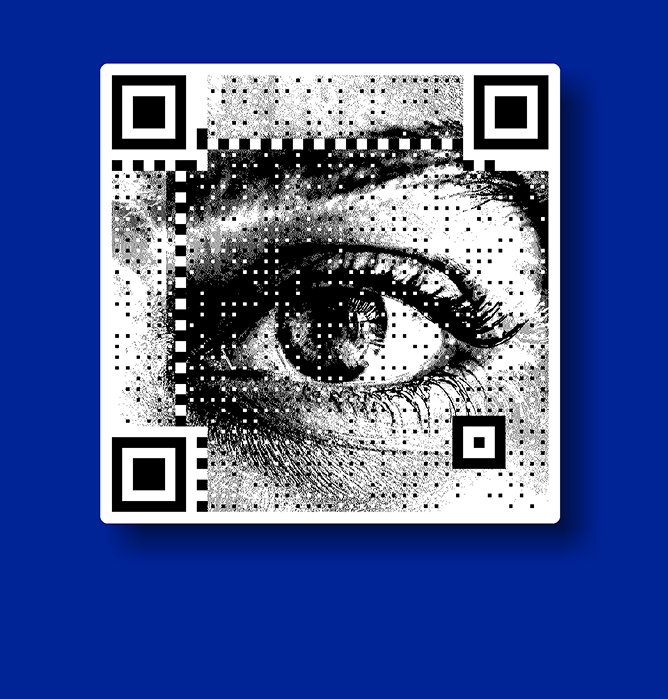
Creative QR codes feel more interactive and visually exciting than standard QR designs. QRKY allows students to personalize QR codes using faces, logos, and graphics, making projects, campaigns, and event promotions look more professional, modern, and attention-grabbing.