
College projects and presentations are becoming more interactive every year. Professors expect more than just slides and printed reports. They want ideas presented clearly, creatively, and in ways that are easy to explore. This is where a free QR code generator for students becomes extremely useful.
Instead of adding long links, extra documents, or bulky appendices, students can attach a QR code to their projects. Anyone reviewing the work can scan the code and instantly access videos, documents, research sources, portfolios, or additional explanations.
For students, this makes projects look more professional and easier to understand.
Let’s explore how QR codes can improve college assignments and how students can use them effectively.
Why Students are Using QR Codes in College Projects
Many college projects include multiple types of content. A presentation might include:
- Research documents
- Survey results
- Video demonstrations
- Case study references
- External articles
If all these links are placed directly in slides or reports, they can make the project look cluttered.
Adding a QR code for college project submissions helps solve this problem. Instead of displaying long URLs, students can create a QR code that links to all the supporting material.
When professors or classmates scan the code, they can instantly view the additional content.
This makes the project easier to navigate and more engaging for the audience.
What Is a QR Code Generator and How Does It Work?
A QR code generator is a tool that converts a link, document, or digital resource into a scannable code.
When someone scans the code with a smartphone camera, they are automatically taken to the linked content.
Students can use a free QR code generator to connect their projects with:
- Google Drive files
- Video presentations
- Research databases
- Survey forms
- Portfolio websites
This means the project can extend beyond the slides or printed report.
It becomes an interactive experience.
Ways Students Can Use QR Codes in Presentations
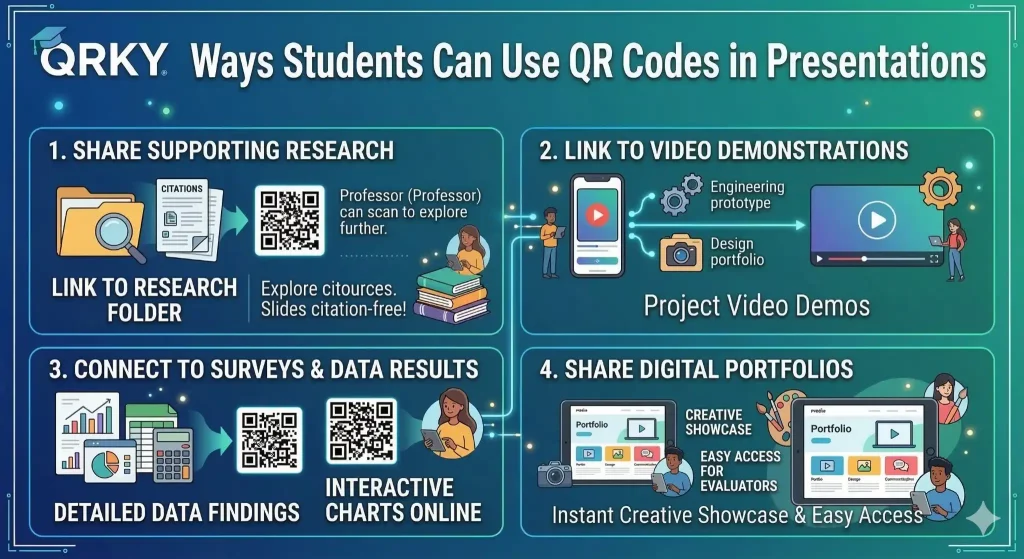
QR codes are especially useful in presentations because they allow students to share more information without interrupting the flow of their slides.
Here are some practical ways students use a QR code for presentation work:
1. Sharing Supporting Research
Instead of adding multiple citations in slides, students can attach a QR code that links to a folder containing research papers, articles, and references.
Professors can scan the code if they want to explore the sources further.
2. Linking to Video Demonstrations
Many college projects require demonstrations.
For example:
- Engineering prototypes
- Design portfolios
- Marketing campaign simulations
- Coding projects
Students can create a QR code that links directly to a video explanation or demo.
This keeps the presentation clean while still providing full documentation.
3. Connecting to Surveys or Data Results
Students often conduct surveys or collect data during research projects.
Instead of showing long spreadsheets, a QR code for college project reports can link to the full dataset or interactive charts online.
This allows reviewers to explore the data more deeply.
4. Sharing Digital Portfolios
Design, media, and communication students often build digital portfolios.
A QR code in a presentation can instantly open the portfolio website.
This makes it easier for professors or evaluators to review creative work.
Step-by-Step: Creating a QR Code for a College Project
Using a free QR code generator for students is simple. Students can follow these steps to add QR codes to their assignments.
Step 1: Choose the Content You Want to Share
Decide what the QR code should link to. This could include:
- Google Drive folders
- Video presentations
- Research documents
- Portfolio websites
Copy the link to the content.
Step 2: Generate the QR Code
Use a trusted platform like QRKY to create your QR code.
Paste the link into the generator, and the tool will instantly convert it into a scannable QR code.
Step 3: Download the QR Code
Download the QR code as an image.
Most platforms allow students to download it in high resolution, so it looks clear when placed in presentations or printed reports.
Step 4: Add the QR Code to Your Project
Place the QR code in a clear and visible location.
Students commonly add QR codes to:
- The final slide of the presentations
- Research posters
- Project reports
- Cover pages
- Appendix sections
Make sure the QR code is large enough to scan easily.
Step 5: Test the Code Before Submitting
Always test the QR code with a smartphone.
Make sure the link opens correctly, and the content is accessible.
Testing prevents issues during evaluation or presentation.
Best Practices for Using QR Codes in College Assignments
To make QR codes effective, students should follow a few simple best practices.
Keep the QR Code Visible
Avoid placing the code in crowded areas of slides or documents. A clear background helps scanners read the code easily.
Provide a Short Label
Add a short message such as:
- “Scan to view project demo”
- “Scan for full research data”
- “Scan to access portfolio”
This tells viewers what they will see after scanning.
Use High-Quality Files
Low-resolution QR codes may not scan properly. Always use a clear image file.
Avoid Too Many Codes
Adding too many QR codes can confuse the audience. Focus on linking the most important resources.
Why QR Codes Make Student Work Stand Out
Professors review many assignments and presentations.
Projects that are clear, organized, and interactive stand out.
Using a free QR code generator for students helps create projects that feel modern and easy to explore.
QR codes show that a student has thought about how the audience will experience their work.
Instead of overwhelming viewers with links and attachments, the information is neatly organized behind a simple scan.
This small improvement can make presentations more professional and memorable.
Final Thoughts
QR codes are becoming a simple but powerful tool for students.
They allow presentations and projects to connect with videos, research materials, portfolios, and additional resources without making the content complicated.
With the help of platforms like QRKY, students can easily create a QR code for presentation slides or a QR code for college project reports in just a few minutes.
Using a free QR code generator for students is a smart way to make academic work more interactive, organized, and engaging.
Sometimes, a simple scan can say more than a long list of links ever could.
FAQs:
1. How can students use QRKY as a free QR code generator for students in college presentations?
Students can use QRKY’s free QR code generator for students to convert links into scannable QR codes that lead to research files, videos, or portfolios. Adding a QR code for presentation slides created with QRKY allows professors and classmates to instantly access additional resources without cluttering the slides with long URLs.
2. Why should students add a QR code for college project submissions using QRKY?
Adding a QR code for college project submissions using QRKY makes assignments more organized and interactive. Instead of including multiple links in reports or slides, students can place one QR code that connects to research materials, survey results, or supporting documents for easier access.
3. What types of content can students link using a QR code for presentation projects with QRKY?
Using QRKY’s free QR code generator for students, learners can link various resources to a QR code for presentation projects. These may include Google Drive folders, research papers, video demonstrations, survey results, datasets, or digital portfolios, allowing presentations to provide deeper insights without overcrowding slides.
4. Where should students place a QR code for college project reports or presentations created with QRKY?
A QR code for college project reports generated with QRKY should be placed in visible areas such as the final presentation slide, research posters, report cover pages, or appendix sections. The QR code should be large and clear enough so classmates and professors can scan it quickly.
5. How does QRKY help students make their academic projects more professional?
QRKY’s free QR code generator for students helps make academic work more professional and interactive. By adding a QR code for presentation slides or project reports, students can organize extra resources neatly, improve accessibility, and present their research or portfolio in a modern format.