Create an Image-Based QR Code in Seconds
Create QR codes that connect users directly to images, photos, or visual content.
An image QR code lets people instantly view visuals by scanning with their smartphone—no typing, no searching, no friction. Whether for print, packaging, or digital media, image-based QR codes make visual content accessible anywhere.
Image QR Code Generator
People do not read product copy. They look at the image, decide in about three seconds whether it is worth their attention, and move on. An image-based QR code generator works with that behaviour rather than against it; the scan happens in the moment of visual interest, not after a block of text has tried to convince them.
QRKY takes that a step further. It embeds your QR CTA photo-realistically inside the image itself — on the creative, the packaging, the poster, or the video frame — so the scan opportunity is right where the viewer is already looking.
Two Things 'Image QR Code' Can Mean — and Why the Distinction Matters
When people search for an image-based QR code generator, they are usually looking for one of two things. It is worth being clear about both upfront, because they solve different problems.
A QR code that links to an image
This is the most common use case. You have a photo, a menu visual, or a campaign creative. You want people to be able to scan and see it — without typing a URL, without searching, without friction. The QR code acts as a shortcut to the visual content.
This works well for restaurant menus, product detail images, how-to visuals, event galleries, and any context where showing someone a picture is more useful than describing it.
A QR code that incorporates an image in its design
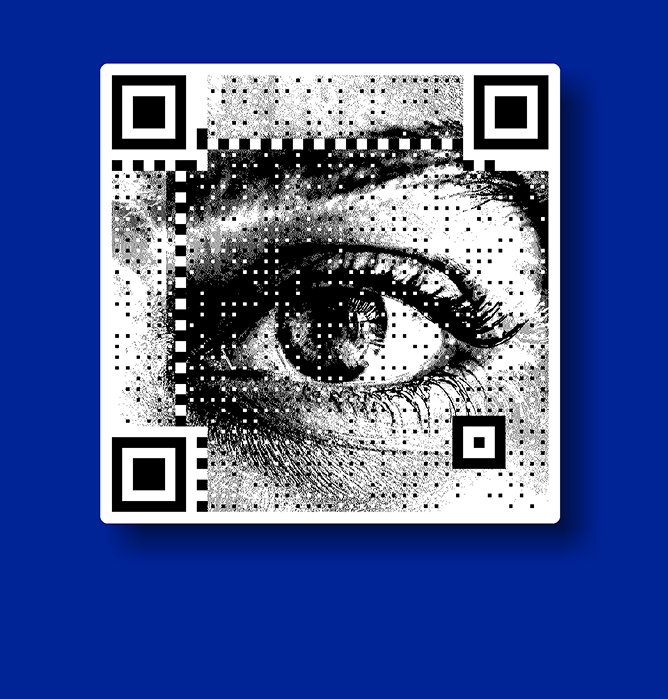
This refers to styling — a QR code where the module pattern is designed around or blended with an image, a brand mark, or a visual element. The QR still points to a destination, but it looks like it belongs in the creative rather than sitting on top of it as a generic grid.
QRKY handles both. But its core capability goes further than either: it generates a photo-realistic QR CTA and embeds it inside your existing creative — the poster, the packaging, the video — so the scan prompt is part of the image, not placed next to it.
The image is linked to a QR code that opens the visual when scanned.
The Gap Between 'Generating a QR Code' and 'Running One in the Real World'
Generating a QR code takes about thirty seconds. Running one across a real campaign — on packaging that ships to 40,000 units, on a DOOH screen in an airport, on a fashion poster that goes up in 200 store windows — is a different challenge.
Static QR codes break when the linked image URL changes. You cannot update them without reprinting. Nobody tells you when scans are dropping off or whether the image is even loading on older devices. The QR code sits wherever someone placed it in the layout — which is rarely where the most attention falls.
These are not edge cases. They are what happens when a QR code moves from a test environment into a live campaign. Most tools, including a basic customized QR code generator, were built for quick generation and not designed for what comes after.
QRKY was. Dynamic destinations, embedded placement, real-time analytics, and zero production rework — these are the features that matter once image QR codes are deployed at scale.
How Different Industries Use Image QR Codes — and What Changes with QRKY?
Food and Beverage — Packaging That Earns Its Place
A drinks brand puts a QR code on their bottle. It links to a cocktail recipe with photography. That is a good use of an image QR code — but only if the link stays live, the image loads fast, and the QR sits somewhere on the label that customers actually notice.
With QRKY, the QR CTA is embedded photo-realistically into the packaging artwork itself — not stamped onto it as an afterthought. The destination is dynamic, so when the brand refreshes the recipe for a new season, they update the link. The bottles already on shelves point to the new content without a single reprint.
Fashion and Retail — Lookbooks and In-Store Experiences
A fashion brand’s lookbook is shot, designed, and approved. At the last minute, someone asks for a QR code to link to the product page. The options are: redesign the layout to accommodate a QR box, or stick one in the corner and hope people find it.
Neither is great. QRKY gives a third option — embed the QR CTA inside the lookbook image, positioned at the product, where the viewer’s eye already sits. It looks designed in. It converts because it appears at the moment of desire, not after it has passed.
Hospitality — Menus, Offers, and Guest Experiences
Hotel restaurants, cafes, and bars have been using QR menus since 2020. The problem is that most of them are static QR codes linking to a PDF that nobody has updated in eight months. The menu is wrong, the link is slow, and the QR code is a plain box printed on a card that has nothing to do with the table’s visual design.
An image-based QR code that links to a well-designed, mobile-optimised visual menu — embedded into the table’s branded materials with QRKY, dynamically updated when items change — is a meaningfully better experience. Not complicated. Just intentional.
Events and Exhibitions — Turning Physical Presence into Digital Action
At a trade show or exhibition, attention is expensive and brief. A large-format banner or a printed stand with a QR code in the bottom corner is not going to drive scans at the moment someone walks past. A QR CTA embedded inside the main visual — at the product, at the key visual, where the eye lands — catches people in the moment they are already engaged.
QRKY’s overlay on event materials means the QR element is part of the design, not a compliance item added after the designer handed off the files. It links to image galleries, lead forms, product demos, or social sharing prompts — and it tracks which ones actually converted.
Media and Publishing — Making Print Interactive
A magazine spread, a brand story in a newspaper supplement, a coffee table book for a campaign launch — print does not have to be passive. An image QR code embedded into editorial photography links readers to extended galleries, behind-the-scenes footage, or exclusive digital content.
The QR element has to earn its place in the design for this to work. A plain box breaks the reading experience. A QRKY overlay — sitting within the image, matched to the editorial aesthetic — extends the story without interrupting it.
The Same Campaign. Two Outcomes.
Here is a side-by-side look at how image QR code campaigns typically run — and how they run with QRKY.
Without QRKY | With QRKY |
|---|---|
A food brand links their packaging QR to a static image of the dish. The link breaks six months later. Reprinting is the only fix. | QRKY’s dynamic overlay lets the brand update the destination — new seasonal recipe, new campaign — without touching the packaging. |
A fashion retailer’s lookbook QR code lands in the bottom-left corner of the poster. Most people never look that far down. | QRKY embeds the QR CTA inside the lookbook image itself — at the product, where the viewer’s eye already sits. |
An events team adds an image QR to a banner. It’s a standalone box that clashes with the event’s visual identity. | QRKY overlays a photo-realistic QR CTA inside the banner creative. It looks like it was designed in from the start. |
A DOOH campaign needs a QR added to an existing video asset. The re-render takes four days. The campaign window is three. | QRKY Film places the QR CTA at a specific frame in the existing video. No re-render. Campaign goes live on schedule. |
Scans happen. Nobody knows what happened after — which image was viewed, whether anyone acted, or where drop-off occurred. | QRKY tracks Scan-to-Result rate, Cost per Scan, and downstream conversions. Every scan is accountable. |
The Scan Is the Beginning. Where You Send People Is the Strategy
A lot of attention goes into the QR code design using a customized QR code generator, and not enough into what comes after the scan. That is where most image QR campaigns underdeliver. Here are the destination types that work — and why.
A single, fast-loading image or gallery
If the whole point is visual content, make it immediate. One image or a tight gallery that loads in under two seconds on a mobile connection. No pop-ups, no email gates, no navigation menus. Show them the thing they scanned for.
A product page with a clear next action
If the image QR code is on packaging or a retail display, the natural next step is the product. Link directly to the product page — ideally with a buy button visible above the fold. Every click added between the scan and the purchase reduces conversion.
A short-form video
Still images are good. Video is better for demonstrating products, showing preparation methods, or showing what a space or experience actually feels like. A restaurant QR that links to a 30-second chef’s video of the dish being prepared is more compelling than a static JPEG of the plating.
A loyalty or reward entry point
Scan-to-enter promotions, loyalty programme sign-ups, and exclusive member offers all convert well from image QR codes — because the viewer already found the product or campaign interesting enough to scan. That is a warm lead. Meet them with something worth their scan.
A WhatsApp or direct contact flow
For service businesses, hospitality, and B2B contexts, linking to a WhatsApp conversation or a pre-filled contact form moves the interaction from passive viewing to active intent in one step. Especially effective in markets where WhatsApp is the default communication channel.
How to Create an Image QR Code with QRKY
- Upload your creative — a product image, poster, packaging artwork, or video file.
- Choose where the scan goes — a URL, image gallery, product page, WhatsApp, lead form, or offer.
- QRKY generates the overlay — a photo-realistic QR CTA is embedded inside your creative at the optimal position. It looks designed in, not added on.
- Preview and confirm — check placement, visual treatment, and scan performance before approving.
- Deploy and track — go live, then monitor scans, Scan-to-Result rate, Cost per Scan, and conversions in QRKY’s dashboard.
No redesign. No re-rendering. No changes to existing files.
Mistakes That Quietly Kill Image QR Code Campaigns
Using a static QR code for anything that might change
If there is any chance the linked image, URL, or campaign destination will need updating — and with packaging and long-run print, there always is — use a dynamic QR code. A static code that links to a broken URL is worse than no QR code at all. It signals to the viewer that the brand does not maintain its own touchpoints.
Linking to an image that is not mobile-optimized
An image that takes six seconds to load on a 4G connection will not wait for most people. Neither will a full-resolution TIFF dropped into a web server folder. The image needs to be compressed, hosted on a reliable server, and tested on actual mobile devices in the environment where scanning will happen.
Placing the QR code where there is space rather than where there is attention
Bottom-right corner. Beneath the footer. Above the legal copy. These are the places QR codes end up when nobody made a decision about where they should go. They are also some of the lowest-attention zones on any creative. If the QR code is worth including, it is worth placing deliberately — at the image, at the product, where the viewer already is.
No fallback for when the destination goes down
Campaign microsites get retired. Image hosts expire. URLs change during website migrations. Any of these can silently break a QR campaign that is still running in the wild. Set a redirect fallback, monitor link health during the campaign window, and do not link directly to a URL you do not control.
Treating the scan as the end of the job
The scan count in your QR tool is not a result. It is the start of a funnel. The question is how many of those scans led to the image being viewed, the product being bought, the form being filled, or the conversation being started. Track Scan-to-Result rate. That is the number that tells you whether the campaign is working.
Your Images Are Already Doing the Work. Give Them a Way to Convert.
If people are already engaging with your visual content — looking at the packaging, stopping at the poster, watching the video — the scan opportunity is there. QRKY embeds it inside the creative, positions it where the eye already goes, and tracks what happens after.
Latest Blogs on Image-Based QR Codes
Image-led QR codes are becoming central to how brands share visual content across physical and digital spaces. These articles explore practical use cases, design considerations, and evolving best practices for image-based QR interactions.
Learn how businesses use QR codes to make visuals more accessible, engaging, and measurable.
FAQs
Image QR Code Generators
Image QR codes are widely used, but there are common questions around how they work and where they perform best. These answers clarify functionality, reliability, and usage considerations.
Can a QR code contain an actual image inside it?
QR codes do not store images within them. Instead, they link to an image or visual destination that opens when scanned.
Does adding an image affect QR code scan reliability?
If designed correctly, image styling does not affect scanning. Proper contrast, sizing, and placement are essential for reliable scans.
Can I create a QR code from a JPG or photo?
Yes, you can generate a QR code that links directly to a JPG, PNG, or photo hosted online, allowing users to view it instantly.
Can I change the image after creating the QR code?
With static QR codes, the linked image cannot be changed. Dynamic QR codes allow you to update the destination image without changing the QR code.
Do image QR codes work on all smartphones?
Yes, image QR codes work on most modern smartphones using the built-in camera app, as long as the destination image is accessible online.
Are image QR codes suitable for printed materials?
They work well on print when the QR code is sized properly and tested in real lighting and distance conditions.
Are image QR codes free to create?
Many platforms allow free creation of basic image QR codes, which are often used for testing or small-scale use.
What are common uses for photo-based QR codes?
They are often used for menus, product visuals, instructions, galleries, event photos, and campaign creatives.
Do image QR codes require internet access?
Scanning works offline, but loading the image requires an internet connection since the image is hosted online.
Are image QR codes suitable for long-term campaigns?
Yes, when designed thoughtfully and managed properly, image QR codes are used for ongoing retail, packaging, and brand experiences.